
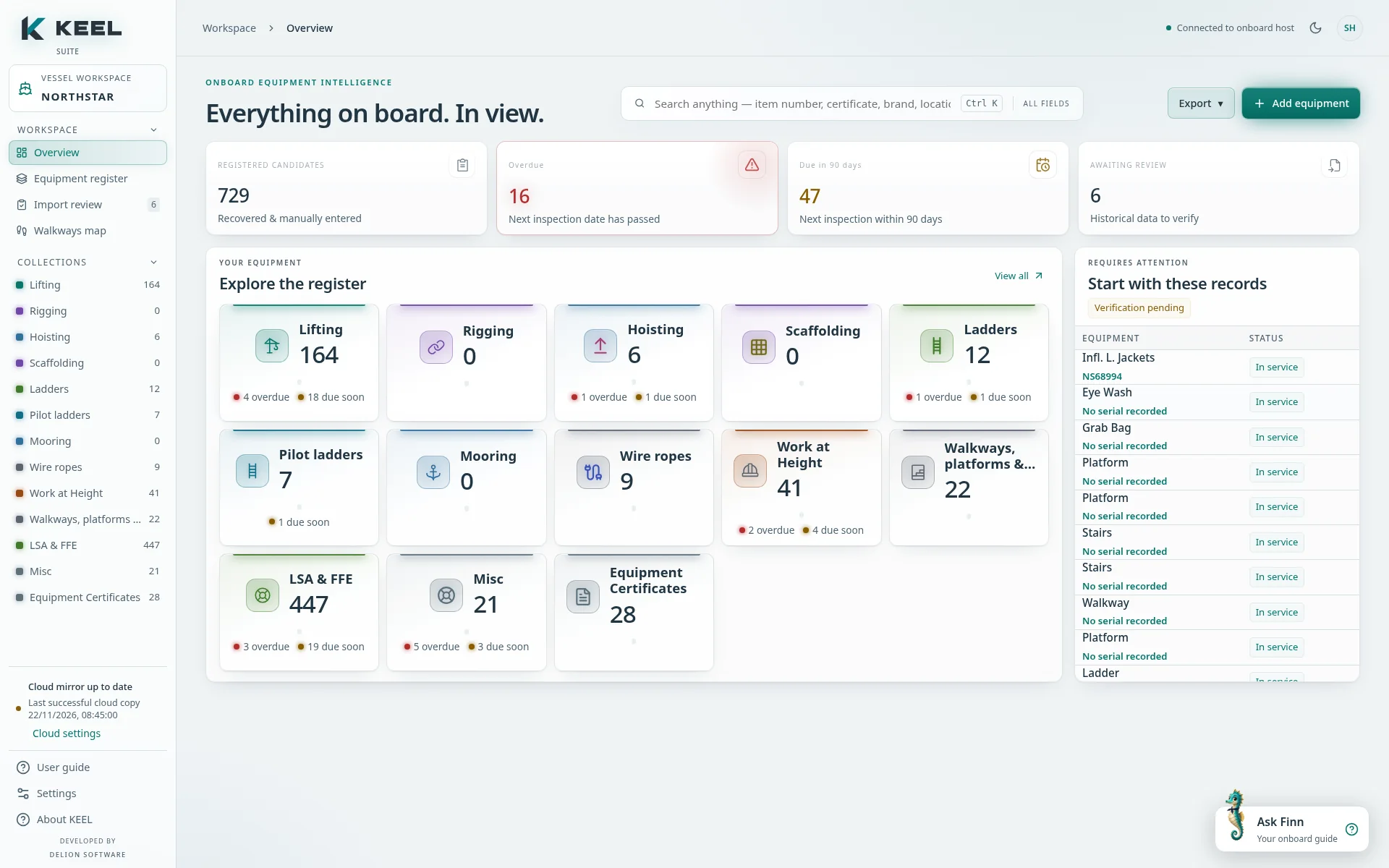
KEEL is the equipment and certificates register we designed and built for one client: a team that works at sea, with no server room, no IT department on board and an internet connection that cannot be relied on. Version 0.6.3 is the biggest step since the first delivery.
The problem 0.6 solves
Up to now one ordinary office PC was the KEEL host. It keeps the register, runs Finn, takes the backups and answers every other PC on the network. The weak point: if that PC is switched off, restarts or loses the shared drive, the other PCs can no longer save.
On a ship, PCs get switched off. So in 0.6 a second PC can stand by.
A standby host that takes over by itself
The standby is a normal PC, kept on and signed in. It keeps no copy of the register; it watches the host on the shared folder. The host writes a heartbeat every two seconds. When the host has not answered for two minutes, the standby takes command and serves the same register from the same shared folder. When the main host has been stable again for five minutes, control goes back to it automatically.
Nobody has to type a command or choose who is in charge. A ledger on the shared folder decides which PC holds command, and only that PC writes.
What the crew sees is deliberately plain: a banner says the standby is taking over and their draft is kept. Saving waits until the standby serves, then the action is repeated. A short notice names what waits for the main host, such as Finn, cloud backup or updates.
On the two host PCs a lamp in the tray shows the state: green when ready, amber when the standby cannot take over, red while a takeover runs, blue while control goes back. If the standby is off or asleep, the main host raises a "standby not reachable" alarm.
The officer's workbook, inside the register
Life-saving and fire-fighting equipment was kept in a workbook: one sheet per type of equipment, its own columns, years of dates. LSA & FFE in 0.6 brings that workbook into KEEL page by page, with the same columns, names and order, and no date lost. Text that someone once typed into a date cell is kept exactly as written and marked as text.
Every date carries a light: green when it is more than 90 days away, amber within 90 days, red within 7 days or past. Hydro-test columns get their own light once the officer sets the interval for that page. Columns can be renamed, moved, added and deleted; a deleted column keeps its cells and can be restored.
Walkways and ladders on the ship drawing
Walkways, platforms, stairs, gangways and ladders are now one collection with a register and a ship map. Each item has its tag, deck area, frame range, side, dimensions and a due date with the same traffic light. Gratings are optional, because steel stairs have none.
On the Walkways map every item is placed on the ship drawing. Items without a place wait in an Unplaced tray; drag one onto the drawing, or select it and press Enter. A walk by deck can be saved as a checklist.
Finn, still offline
Finn, the built-in assistant, runs a local language model on the host PC's processor. No graphics card and no internet are needed, and it answers in English and Dutch. It answers from the register and the product guide and shows the record fields behind each answer. It cannot approve equipment or certify a document; the responsible person decides.
KEEL also keeps to a fixed share of the PC it runs on. The host and everything it starts work within a fixed memory allowance and at a lower priority than the person using the PC, and Finn starts only when there is free memory for it.
Exports and updates
The register exports to PDF and Excel for the table you are looking at, and to JSON for all loaded records.
Updates are signed. KEEL checks every program file against its signature before it runs it. Before an update it makes a recovery copy of the database. If a new version fails, the launcher can fall back to a verified earlier release. An update contains program code only; the register data is never an update target.
Backups that do not replace live data
The host takes a local recovery snapshot about every fifteen minutes and keeps the last eight. The optional cloud backup is encrypted and deduplicated before it leaves the ship. A restore shows a verified preview first, creates a new database generation and keeps the previous one, so a restore never silently replaces what the crew is working on.
Why we build it this way
KEEL has exactly one client, and we still treat it like a product: a written scope, acceptance tests, a bilingual guide and signed releases. The standby host applies the same idea to failure: expect PCs to stop, and keep the register usable when they do.
If your team has a register, a workbook or a process that has to work without a server or a reliable connection, we can build it the same way. Start a project.